Squarespace Templates for a Multilingual Site: What to Check
Squarespace has no built-in translation, so the template matters less than the translation layer. See what to check in a template, the setup options and costs.
Squarespace has no built-in translation feature, so the template matters less than the translation layer you add. Choose a text-light template with room for longer words in your languages. Then pick the official Weglot integration (available only on version 7.1), a manual multi-page build, or a tool that works with your site's setup.
Key takeaways
- Squarespace's help center lists two official routes: the Weglot integration, which is only available for version 7.1, and a manual multi-page build.
- Check your Squarespace version first, because it decides which routes are open to you.
- Weglot's paid plans start at €15 a month, and a second language moves you to its Business tier at €29 a month.
- Test a template with the longest translated version of your headings, buttons and menu, not with the original text.
Does Squarespace have built-in translation?
No. A third-party Squarespace guide states that, as of mid-2026, the platform still has no built-in translation feature, so the official paths are the Weglot extension or a manual multi-page setup.
Squarespace's own help center describes the same two routes. Its Weglot article says the integration is only available for version 7.1, and sites on version 7.0 are pointed to a manual setup.
The site language setting does not solve the problem. According to SQSPThemes, it changes only Squarespace's built-in interface text, not the content you wrote.
Some template roundups claim Squarespace includes native multilingual features. The Linguise template article says so directly, but that claim conflicts with Squarespace's help center. A member of the Squarespace Forum also notes that Squarespace has made no official announcement of a native, comprehensive multilingual feature in active development.
What should a template get right for translated text?
The template does not translate anything. It determines how translated text looks, and that is where layouts usually break. Weglot's blog advises text-light templates because text expansion in wordier languages can make text boxes overlap. Four checks cover most of the risk:
- Room for longer words: Test headings, buttons and navigation labels with the longest version of your text in each language you plan to offer.
- A language switcher that fits the header: It should stay readable on mobile and should not push the menu out of place.
- A menu that works in every language: Translated menu items should fit without wrapping awkwardly or hiding links.
- Proof from real sites: Weglot's blog reports that one of Squarespace's own multilingual demo sites was built with Nueva, a template from the Brine family. A demo is a useful starting point for testing, but it does not show that the template will suit your content.
Which ways of adding translation to Squarespace exist?
The options differ mainly in where translations are edited and how the tool is installed.
| Option | Version and setup | Where you edit translations |
|---|---|---|
| Weglot integration | Version 7.1 only | In Weglot's dashboard |
| Manual multi-page build | Described in Squarespace's manual guide | In Squarespace |
| ConveyThis (domain level) | Business plan or higher, plus a DNS change | In the tool's own interface |
| Lantis | One line of code, no DNS change, no design change | Visual editor, with a glossary per language |
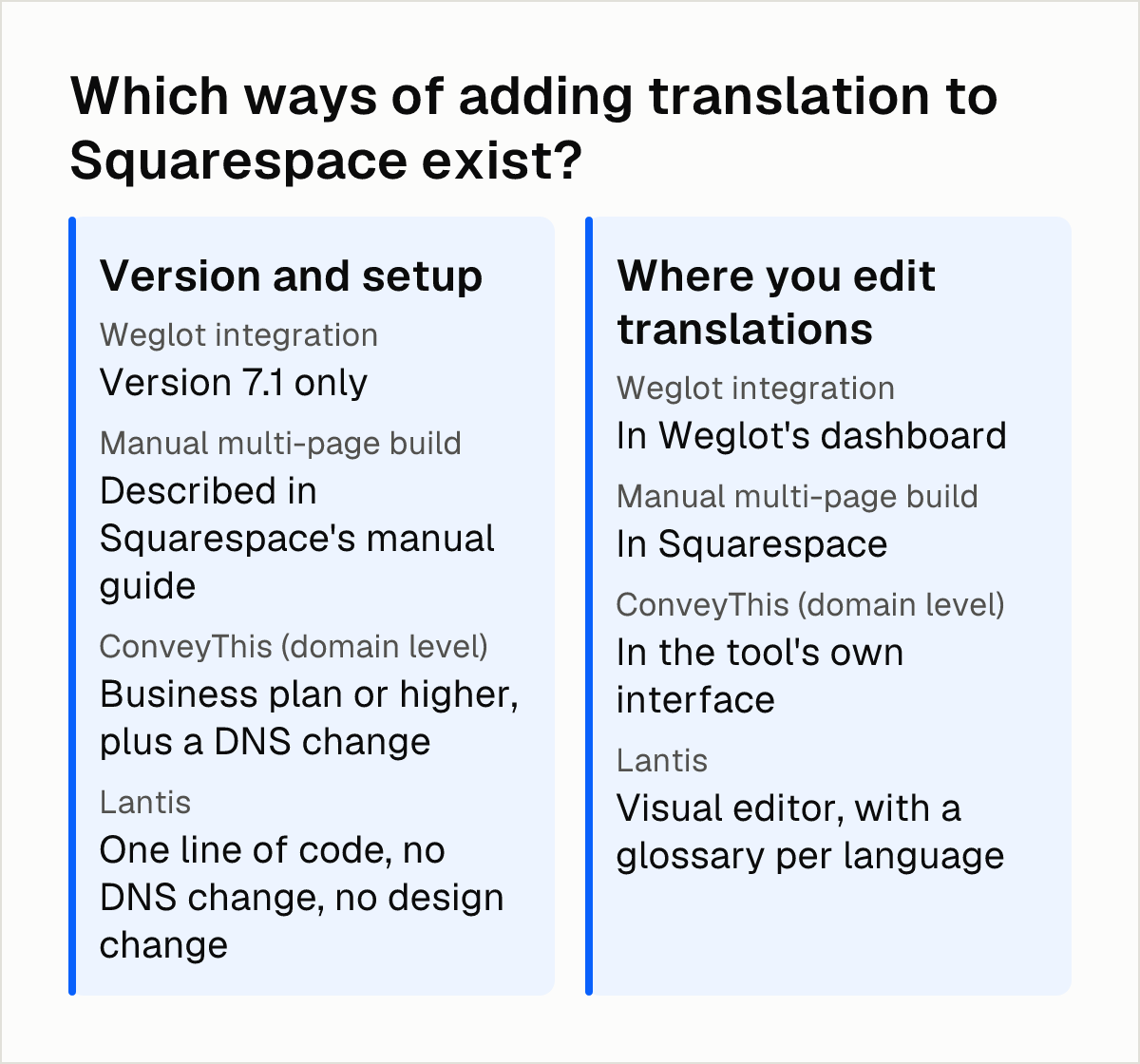
Weglot integration. Squarespace's Weglot help article presents it as the built-in route for version 7.1, and the same article says the integration adds hreflang tags automatically. It is also explicit about where editing happens:
"It's not possible to edit translations directly in Squarespace." — Squarespace's Weglot help article
Manual multi-page build. Squarespace's manual multilingual guide explains how to translate a site into several languages while keeping it search-engine friendly, and it recommends the Weglot integration if you are on version 7.1. The sources consulted do not detail its maintenance effort.
ConveyThis. The tool states that, on Squarespace, its domain-level setup needs the Business plan or higher and a DNS change. That matters if you do not control your domain settings.
Lantis. Lantis translates Framer, Webflow, Shopify, WordPress and any website with AI, using Gemini by default, with Claude, DeepL or DeepSeek as alternatives. It gives each language its own URL, generates hreflang and sitemaps automatically, and installs by pasting one line of code, without changing DNS or the design. Squarespace is not among the platforms it names, so confirm compatibility with your site before you commit. Lantis's own article on translating Squarespace without Weglot or duplicate pages covers the alternatives in more detail.
What does each option cost per month?
Weglot's paid plans start at €15 a month, or €150 a year, for 10,000 translated words and one destination language, according to Multilingualizer's pricing calculator. The same page says the free plan covers up to 2,000 translated words in one language, the only no-cost tier for a Squarespace site.
The jump comes with a second language. A 2026 pricing analysis reports that going from one translated language to two means moving from Starter to Business, from €15 to €29 a month.
The platform itself is also getting more expensive. NoJoke Agency reports that Squarespace raised annual-plan prices in July 2026: Basic went from USD 16 to 19 a month, Core from 23 to 29, and Plus from 39 to 49. Those increases apply before you add any translation tool.
Lantis charges €3 a month for one language, €2.50 per language a month for 2 to 9 languages, and €2 per language a month for 10 or more. Each language includes 500,000 words, and Lantis bills only for active languages, with no limit on sites or visitors. Extra words cost €1 per 500,000, paid once. The Agency plan costs €49 a month for up to 20 sites and up to 5 languages per site.
| Option | Monthly cost | Word allowance | Notes |
|---|---|---|---|
| Weglot Free | €0 | 2,000 words, one language | Only no-cost tier |
| Weglot Starter | €15 | 10,000 words, one destination language | Entry paid plan |
| Weglot Business | €29 | The sources consulted do not detail it | Needed for a second language |
| Lantis | €3 for one language; €5 for two; €12.50 for five | 500,000 words per language | Billed per active language |
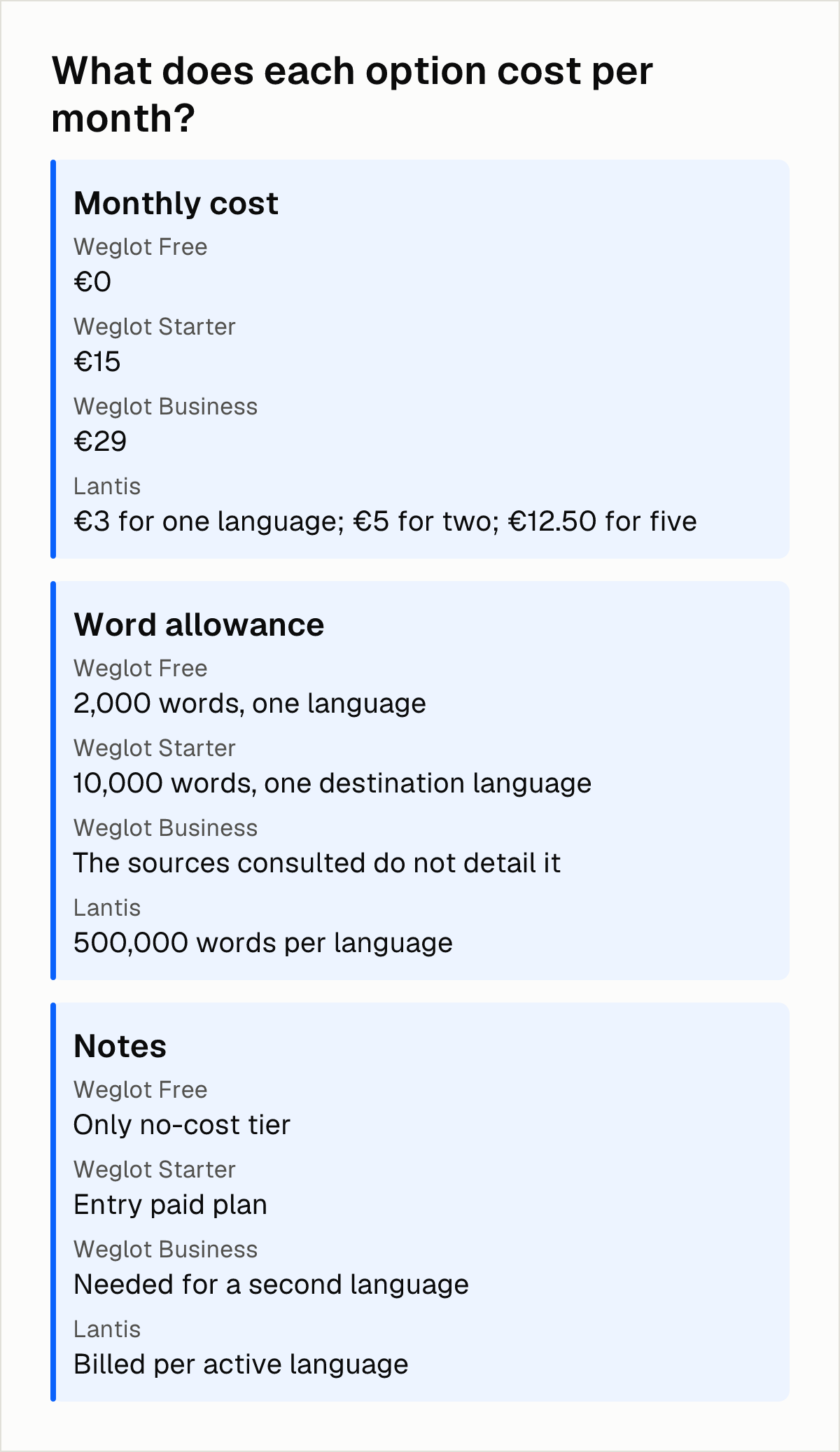
Weglot and Lantis include different allowances, so the monthly figure alone does not settle the comparison. For two languages, Lantis comes to €5 a month (2 × €2.50) against €29 for Weglot Business, but the right choice also depends on whether the tool works with your Squarespace version and on the word volume you need in each language. If you are weighing lower-cost options, Lantis's article on cheaper Weglot alternatives in 2026 breaks down what each one costs.
Which SEO checks apply to any translation option?
These checks apply whatever tool you use. Google's documentation on localized versions sets out the main points:
- Hreflang shows relationships: Google does not use hreflang or the HTML lang attribute to detect a page's language; it uses algorithms for that, so hreflang tells Google how the versions relate to each other.
- Every version lists every version: each language version must list itself as well as all other language versions in its hreflang annotations. Check this on every page, not only the home page.
- Translate the main content: according to the same documentation, localized versions are only treated as duplicates if the main content remains untranslated.
- Add a fallback: Google suggests a fallback page for unmatched languages, using the x-default value, especially on language selectors and auto-redirecting home pages.
- Let users choose: a 2026 international SEO guide reports that Google recommends letting users choose their language and advises against automatic redirects based on an assumed language.
On Squarespace, the Weglot integration adds hreflang tags automatically, according to Squarespace's help center. With a manual build or another tool, verify the output yourself.
Which setup fits which site?
Version 7.1 with one extra language and little copy: Weglot's free plan covers 2,000 translated words in one language, so a short site can start there. A site with more text will need a paid plan.
Version 7.1 with two or more languages: the Weglot integration is the route Squarespace recommends, but a second language moves you to the Business tier. Compare the total cost with per-language pricing and check your word count against each allowance.
Version 7.0: Squarespace points these sites to the manual multi-page setup, because the Weglot integration is not available.
A translation layer independent of the platform: Lantis works across the platforms it lists, and Squarespace is not among them, so confirm support first. ConveyThis is another option if you can make the DNS change and are on the Business plan or higher.
Whichever you choose, do not pick a template for multilingual use on looks alone. Run the text-expansion, switcher and menu checks above with your own longest translated text.
Next steps
- Confirm in your Squarespace settings whether your site runs on version 7.0 or 7.1, since the Weglot integration is only available on 7.1.
- Count the words on your site and multiply by the number of languages you plan to offer, so you can compare allowances rather than prices alone.
- Replace the headings, buttons and menu of your shortlisted template with the longest translated text you expect, and check the layout on mobile.
- After publishing, open each language page and confirm its hreflang annotations list itself and every other version.
- If you want to see how Lantis handles hreflang and sitemaps, its checklist for multilingual SEO shows what to verify; you can also write to hello@get-lantis.com to ask whether your Squarespace site is supported.
Frequently asked questions
Can Squarespace translate my website automatically without a third-party tool?
No. A third-party Squarespace guide says that as of mid-2026 there is no built-in translation feature. The site language setting only changes Squarespace's interface text, not your own content.
Does Weglot work on Squarespace 7.0 or only on 7.1?
Squarespace's help center says the Weglot integration is currently only available for version 7.1. Sites on version 7.0 are pointed to a manual setup.
How much does it cost to make a Squarespace site bilingual each month?
It depends on the tool. With Weglot, a 2026 pricing analysis puts a second language on the Business plan, at €29 a month instead of €15. Lantis charges €2.50 per language a month for 2 to 9 languages. Squarespace's own plan price comes on top.
Do I need hreflang tags on a Squarespace site?
Yes, if you publish several language versions. Google's documentation says each language version must list itself and all other versions in its hreflang annotations. The Weglot integration adds them automatically, according to Squarespace's help center.
Sources
- Multilingual Squarespace: Weglot vs Manual (2026 Guide) — UOGAweb
- Creating a multilingual site with Weglot — Squarespace Help
- Manually creating a multilingual site — Squarespace Help
- How to create a multilingual website on Squarespace — SQSPThemes
- 7+ Best Squarespace template for multilingual website — Linguise
- Multi language translation and page settings inside Squarespace? — Squarespace Forum
- Best multilingual Squarespace sites — Weglot
- Best Design Practices for Multilingual Squarespace Sites — Weglot
- Squarespace Translation: Multilingual Site with AI — ConveyThis
- Weglot Pricing Calculator: Plans, Costs and Squarespace Checks — Multilingualizer
- Weglot Pricing 2026 Explained — ShipGlobal
- Squarespace Pricing After the 2026 Increase — NoJoke Agency
- Localized Versions of your Pages — Google Search Central
- International SEO: Hreflang & Multilingual Guide — Digital Applied
Pon tu web en varios idiomas hoy.
Una línea de código. SEO real por idioma. Traducción con IA. Sin tarjeta para empezar.