Hreflang Tags: What Google Documents and What to Check
Hreflang tells Google which language or regional page to show, not to rank higher. Learn the rules, codes, methods and checks that make it work.
Hreflang tells search engines which language or regional version of a page to show to each user. It does not raise rankings or detect the language a page is written in. Google's documentation accepts the tags through three equivalent methods (HTML head, HTTP header or XML sitemap), but they only work when every version lists itself and all the others, and the links point back to each other.
Key takeaways
- Make every language version list itself and every other version, then check that each alternate links back.
- Write alternate URLs in full, with https://. A relative path such as /foo is not a valid value.
- Choose one delivery method your stack can maintain. Google treats the three as equal, so adding all three gives no extra benefit.
- Make each translated page canonicalize to itself, because localized versions only count as duplicates when the main content stays untranslated.
What does hreflang do, and what does it not do?
Google states the purpose of hreflang plainly: it helps Search send users to the version of a page that matches their language or region. The documentation does not say the tag raises rankings. That distinction matters when you plan a multilingual project, because the tag solves a routing problem, not a visibility problem. If your Spanish page already ranks in Spain, hreflang helps make sure a Spanish speaker in Mexico or Madrid lands on the right version. It does not push the page higher.
Hreflang also does not tell Google which language a page is written in. Google detects language with its own algorithms and does not use hreflang or the HTML lang attribute for that. A correct annotation will help select the right version for a user, but it will not change how the page itself is read.
Third-party sources disagree about ranking effects. Blogoose states that hreflang is not a ranking boost and that a checklist treating it as a growth switch misreads Google's documentation. A German-language Ahrefs guide, citing a Google video by Gary Illyes, claims that pages in an hreflang cluster share ranking signals and can therefore be affected directly. Google's documentation only describes the matching of users to versions, so plan the work around that outcome.
Which rules make hreflang annotations work?
Two rules do most of the work: every version lists itself, and every link is returned.
Self-reference. Every language version has to reference itself in the set, plus every other version. A page that lists only its alternates is incomplete under Google's rules, even if the alternates are correct.
Return links. If page X points to page Y and Y does not point back, Google ignores those annotations. The rule exists so that a third party cannot claim one of your pages as its alternate.
A simple HTML set for three versions looks like this. Every page in the set carries the same block:
<link rel="alternate" hreflang="en" href="https://example.com/en/" />
<link rel="alternate" hreflang="es" href="https://example.com/es/" />
<link rel="alternate" hreflang="fr" href="https://example.com/fr/" />
<link rel="alternate" hreflang="x-default" href="https://example.com/" />
Identical blocks on every page make self-reference and return links automatic. The usual failures come from blocks that differ from page to page, such as a new language added to the home page but not to the product pages.
How far does one error reach?
Third-party sources disagree here. A Rebrixe article claims a single error can make Google ignore the entire hreflang set for that group of pages, not only the broken entry. A Digital Applied guide says a missing return link affects only that reciprocal pair. Google's documentation describes pair-level behavior. In practice, fix every missing link rather than relying on the narrower reading.
Google also allows you to leave some languages off some pages when full reciprocal linking is hard to maintain, and it still processes the pairs that point to each other. It advises linking newer variants back to the dominant original language.
Where should hreflang go: HTML head, HTTP header or sitemap?
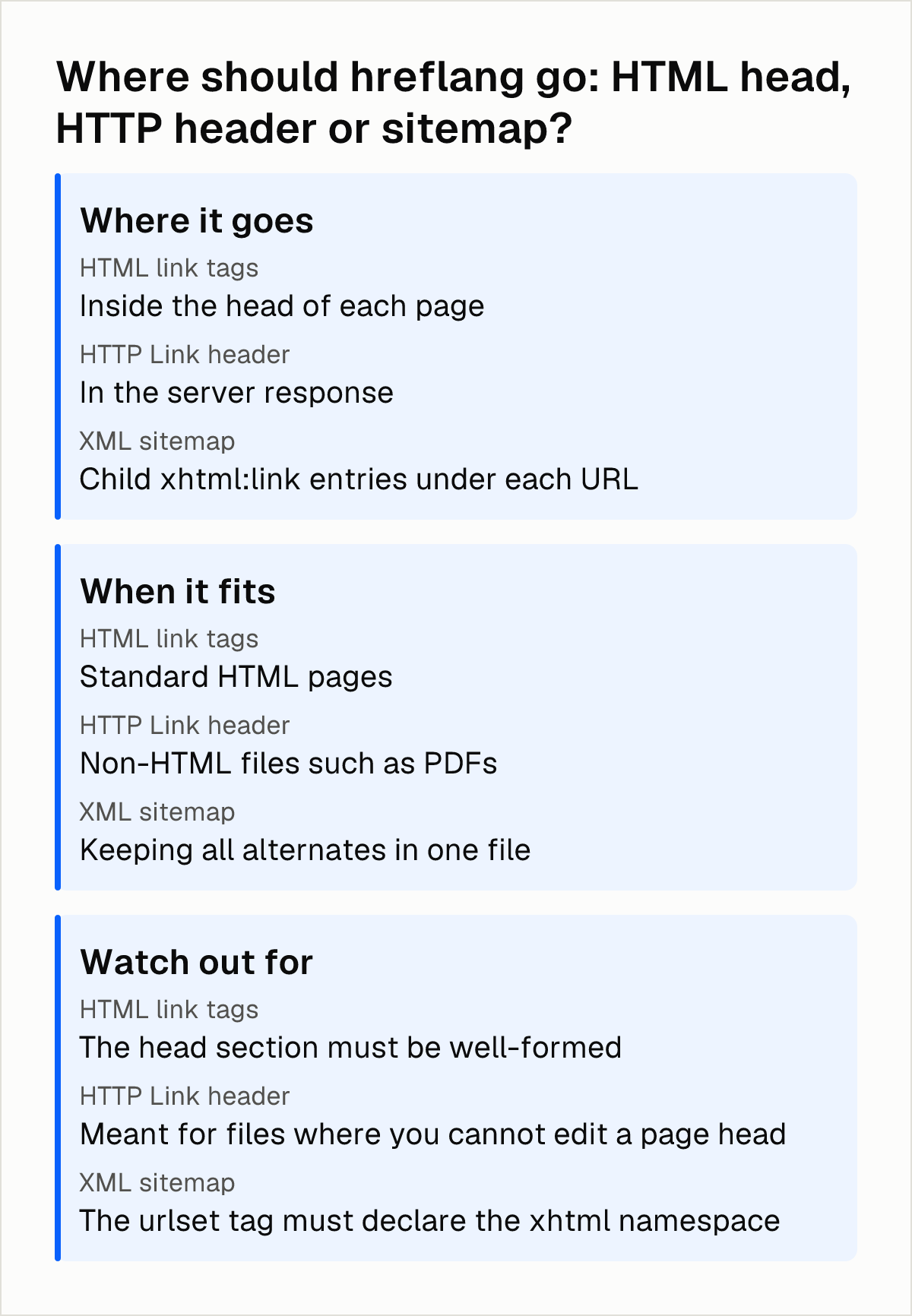
Google treats the three delivery methods as equal, so the question is which one your stack can keep correct. According to Google's documentation, running all three together brings no extra benefit in Search.
| Method | Where it goes | When it fits | Watch out for |
|---|---|---|---|
| HTML link tags | Inside the head of each page | Standard HTML pages | The head section must be well-formed |
| HTTP Link header | In the server response | Non-HTML files such as PDFs | Meant for files where you cannot edit a page head |
| XML sitemap | Child xhtml:link entries under each URL | Keeping all alternates in one file | The urlset tag must declare the xhtml namespace |
HTML head
The link tags must sit inside a well-formed head section. If you are unsure, Google suggests checking the rendered page with an HTML validator.
XML sitemap
Each URL entry needs child xhtml:link elements that list every language variant, including the page itself:
<url>
  <loc>https://example.com/en/</loc>
  <xhtml:link rel="alternate" hreflang="en" href="https://example.com/en/" />
  <xhtml:link rel="alternate" hreflang="es" href="https://example.com/es/" />
</url>
The same applies to the Spanish entry, which repeats the full set. The urlset tag must declare the xhtml namespace, or the entries will not be valid.
HTTP header
The Link header method is meant for non-HTML files such as PDFs, where you cannot put tags in a page head. If your site is made of ordinary pages, this method is rarely the one to choose.
URLs and domains
Whichever method you use, alternate URLs must be fully qualified, including https://. Relative paths such as /foo are not valid values. The versions in a set do not need to share a domain, so separate country domains or subdomains can belong to the same hreflang group.
How do language and region codes work?
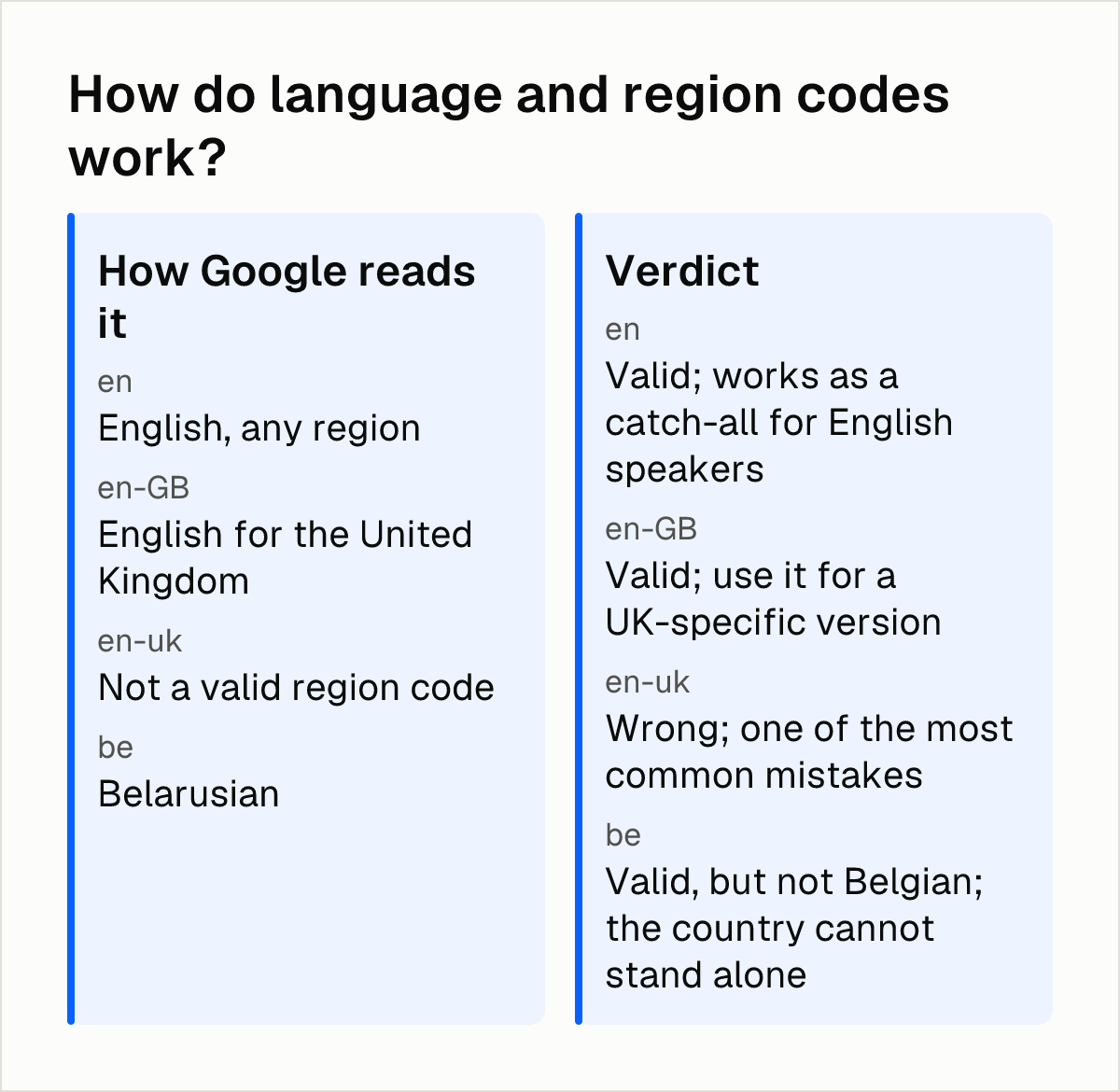
Per Google's documentation, language codes follow ISO 639-1, and the optional region follows ISO 3166-1 Alpha 2. A region cannot appear without a language. Google does not derive a language from a country code, so "be" is read as Belarusian, not as Belgium.
| Value | How Google reads it | Verdict |
|---|---|---|
en | English, any region | Valid; works as a catch-all for English speakers |
en-GB | English for the United Kingdom | Valid; use it for a UK-specific version |
en-uk | Not a valid region code | Wrong; one of the most common mistakes |
be | Belarusian | Valid, but not Belgian; the country cannot stand alone |
Codes such as EU, UN or UK have no effect on Google Search. For the United Kingdom, the region code is GB. Semrush lists "en-uk" as one of the most common mistakes.
When should you use en and when en-GB?
Use en-GB when you publish a version aimed specifically at readers in the United Kingdom. When a site has several regional English versions, such as en-IE, en-CA and en-AU, Google suggests a generic English (en) page as a catch-all for other English-speaking locations.
Do you need x-default?
Google recommends an x-default value for visitors whose language matches none of your versions. It says the value was designed mainly for language selector pages, so it works best when pointed at one.
Can hreflang conflict with canonical tags?
Yes. The conflict appears when every language version canonicalizes to the English page. The translated pages carry hreflang annotations, but their canonical tags declare them duplicates of another page, so the signals contradict each other. Each translated page should canonicalize to itself.
A Magefan audit example shows the typical case: all three language versions canonicalize to the English page while still carrying hreflang tags.
Google also states that localized versions are only considered duplicates if the main content remains untranslated. A page with genuinely translated content is not a duplicate of the original by default, so there is no reason to canonicalize it away. For the overlap between the two tags in practice, Lantis has a guide on canonical and hreflang together and another on duplicate content and translations.
How do you check an hreflang implementation?
Start with reciprocity, because it is the check that catches the most errors. Run through these points for each page:
- Self-reference: Confirm that the page lists itself in its own set.
- Return links: Confirm that every alternate lists the page back. Because sources disagree on how far one missing link spreads, check every pair.
- Absolute URLs: Confirm that every URL includes https:// and loads.
- Codes: Check each language and region code against the rules above, including en-GB and the target of x-default.
- Canonicals: Confirm that each translated page points its canonical tag at itself.
- Delivery method: Confirm that the head is well-formed, or that the urlset declares the xhtml namespace if you use a sitemap.
Third-party tools can help find errors. Google's documentation lists hreflang generators and testing tools but states that they are not maintained or checked by Google. Use them to find problems, then confirm the result against Google's rules.
For a broader review of a multilingual site, Lantis has a checklist for checking multilingual SEO that covers more than hreflang. If you are replacing your translation tool, the checklist for switching translation tools without losing SEO explains how to keep URLs and signals stable during the move.
Next steps
- Export a list of your language versions for one important page and check that each one lists itself and every other version.
- Open each alternate and confirm it points back to the first page, and that every URL is absolute with https://.
- Replace any invalid codes: change "en-uk" to en-GB, and never use a country code on its own.
- Check the canonical tag on every translated page, and make sure it points to that page and not to the English one.
- If you want the tags generated for you, Lantis creates a separate URL per language with hreflang and sitemaps automatically, installed by pasting one line of code without changing DNS or design. The Shopify setup is described in hreflang on Shopify, step by step.
Frequently asked questions
Do hreflang tags improve rankings, or only help serve the right language version?
Google describes hreflang as a way to point users to the most appropriate version of a page by language or region. It does not say the tag raises rankings. Some third-party guides claim a ranking effect, but Google's documentation supports only the routing purpose.
What is the difference between en and en-GB, and when should I use each?
The value en targets English speakers anywhere, while en-GB targets English speakers in the United Kingdom. Use en-GB when you publish a UK-specific page. When you have several regional English versions, Google suggests a generic en page as a catch-all. The value en-uk is invalid.
Where should I put hreflang tags: HTML head, HTTP headers, or sitemap?
Any of the three works, since Google treats them as equivalent. Use the HTML head for ordinary pages, an XML sitemap when you want to manage all alternates in one file, and HTTP headers for non-HTML files such as PDFs. Using all three together adds no benefit.
What is x-default in hreflang and do I need it?
It is a fallback for visitors whose language matches none of your versions. Google recommends it and says it was designed mainly for language selector pages, so it works best with them.
Can hreflang conflict with canonical tags?
Yes, when every language version canonicalizes to the English page while also carrying hreflang tags, because the two signals contradict each other. Each translated page should canonicalize to itself. Google considers localized versions duplicates only if the main content stays untranslated.
Sources
- Localized Versions of your Pages (Google)
- Hreflang and Localized Versions Need Return Links - BloGoose
- Hreflang: Der einfache Guide für Anfänger (Ahrefs)
- Common Hreflang Errors (And How to Fix Them) - Rebrixe
- International SEO: Hreflang & Multilingual Guide - Digital Applied
- 7 Common Hreflang Mistakes (and How To Fix Them) - Semrush
- 10 Common Hreflang Mistakes and How to Fix Them - Magefan
Pon tu web en varios idiomas hoy.
Una línea de código. SEO real por idioma. Traducción con IA. Sin tarjeta para empezar.